Add/Remove Travel Agent Profiles from Departed Reservations
Stay is enhanced to allow users to add or remove a travel agent profile from departed reservations. Previously, a travel agent profile could be added or removed from reservations in the Arriving, Reserved, and In-House statuses only.
Permission
The following new permission must be assigned to enable users to add or remove a travel agent profile from departed reservations.
-
Stay_UpdateTravelAgentOnCheckout
This permission is assigned to the System Administrator role by default.
Add Travel Agent Profile to Departed Reservations
Users with the Stay_UpdateTravelAgentOnCheckout permission can add a travel agent profile to departed reservations by clicking on the +Add Travel Agent option in the Reservation Details section of departed reservations. When clicked, the Travel Agent or IATA field appears where users can search and select a travel agent profile. Once selected, the Commission field appears that displays the commission percentage configured for the travel agent profile. Users can override the commission percentage if required.
Remove Travel Agent Profile from Departed Reservations
Users with the Stay_UpdateTravelAgentOnCheckout permission can remove a travel agent profile from departed reservations by clicking the remove icon displayed for the profile in the Reservation Details section of departed reservations. When users click the remove icon and click Save, the Remove Travel Agent pop-up screen appears.
-
If the travel agent profile does not have a commission percentage configured, the travel agent profile will be removed.
-
If a commission amount is due and yet to be paid, users are prompted to confirm if the travel agent profile must be removed.
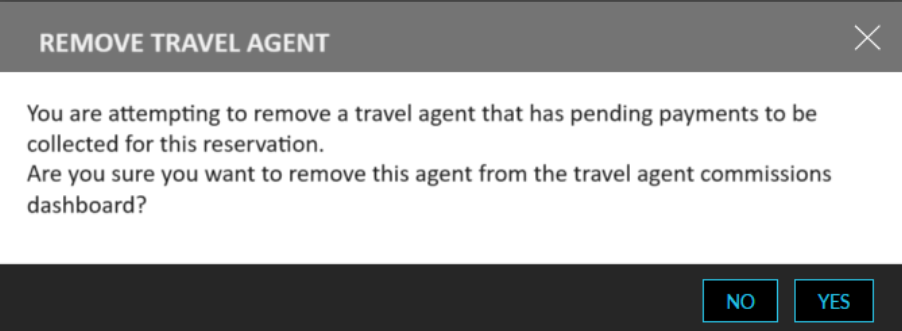
When users click Yes, the travel agent profile will be removed from the reservation and the Travel Agency Commissions Dashboard.
-
If a commission amount was already paid, users are prompted to confirm if the travel agent profile must be removed.
When users click Yes, the travel agent profile will be removed from the reservation and the Travel Agency Commissions Dashboard.
Travel Agency Commissions Dashboard
When a travel agent profile is added to a departed reservation, a record is created in the Travel Agency Commissions Dashboard (Accounting ➜ TA Commissions). Users can view the commission amount to be paid to the travel agent if applicable. Users can perform existing operations such as overriding the commission percentage, apply payments, and so on.
Travel Agent Commissions Report (Dynamic)
The Payment column in the Travel Agent Commissions Report (Dynamic) is renamed as Payment Status and a new column, Payment Amount, has been added to the report. The Payment Amount column will be displayed only when users select the column in the Column Settings screen of the report. This column displays the commission amount paid for the travel agent profile added to departed reservations. When the commission percentage is overridden for a travel agent profile, the updated commission amount is displayed.
The values displayed in the following columns in the report are hyperlinked:
-
Travel Agent: When clicked, users are navigated to a new tab where the travel agent profile is displayed.
-
Contact Person: When clicked, users are navigated to a new tab where the associated guest profile is displayed.
-
Reservation: When clicked, users are navigated to a new tab where the reservation is displayed.
-
Guest Name: When clicked, users are navigated to a new tab where the associated guest profile is displayed.
Reservations Import
Users can continue to create reservations through the reservation import sheet in the Profile & Reservations Import/Export screen (All Settings ➜ General ➜ Profile & Reservations Import/Export ➜ Import) along with the travel agent profile ID and the commission percentage.
Logs
A record is created in the Audit Log screen (Reports ➜ Audit Log) and in the Reservation History section of departed reservations when the following operations are performed:
-
Addition of a travel agent profile to departed reservations
-
Override the commission percentage of a selected travel agent profile
-
Deletion of a travel agent profile from departed reservations
Feature Configuration
Enable the Payment Collected History - TA Commissions Dashboard feature setting.
Navigate to a departed reservation with no travel agent profile associated and click the +Add Travel Agent option in the Reservation Details section.
Search and add a travel agent profile to the reservation.
Navigate to the Travel Agency Commissions Dashboard (Accounting ➜ TA Commissions) to view the commission amount to be paid for the travel agent profile added to the reservation.
or
Navigate to departed reservations with travel agent profile associated and click the remove icon displayed for the profile in the Reservation Details section.
Click the remove icon. The travel agent profile will be removed from the reservation and Travel Agency Commissions Dashboard.